> ## Documentation Index
> Fetch the complete documentation index at: https://docs.tai42.ai/llms.txt
> Use this file to discover all available pages before exploring further.
# API keys
> Sign in with a deployment API key and provision further keys from the Studio.
The Studio has no user database of its own. It authenticates with an API key
provisioned on the server, holds it in the browser, and sends it on every
request. The key is a full-access credential — treat it like a password.
## Signing in
The operator bootstraps a full-privilege API key on the server, then pastes it
into the Studio at [`/login`](/studio/login). The key is held in memory by
default; the **remember on this device** opt-in persists it to the browser
session so later navigations in the tab stay authenticated. When the server also
runs an [accounts](/concepts/accounts) provider, the key field sits behind the
*"Use an API key instead"* toggle on the [sign-in screen](/studio/login) — a
permanent fallback alongside human login.
The first key is a full-privilege credential, including tool execution. The
Studio stores it client-side and sends it on every request — anyone with the key
can run any tool on the server. Provision it out of band and treat it like a
password.
## Keys are owned credentials
Once an [accounts](/concepts/accounts) provider is enabled, an API key is a
credential **owned** by an account rather than a free-standing secret. Ownership
changes what a key may hold and who may mint it:
* **A key can never out-scope its owner.** A key a non-admin mints is capped at a
subset of its owner's own authority; a request for more is rejected at mint
time. The cap is re-checked on every call, so if the owner's role is narrowed —
or the owner is disabled — the key is attenuated with them on its next request.
* **Only an admin may mint an ownerless key.** The ownerless key is the headless,
machine-to-machine credential that belongs to no human account. Reserving it to
admins keeps automation working while making an owner-bound key the default.
* **Key breadth is not admin.** A wide `["*"]` scope on a key does not make its
holder an administrator of the key surface — it cannot list, edit, or revoke
other owners' keys. Administration comes from the owner's role, never from a
key's scope breadth.
## Provisioning more keys
Once signed in, the operator provisions further keys — full-privilege or scoped
— from the API-keys tab of the [Settings](/studio/admin-console#settings)
screen. That tab drives the server's `/api/auth` provisioning endpoints, so a
key minted in the Studio is the same key you could mint from the
[`tai keys`](/reference/cli/keys) CLI.
The keys table carries an **Owner** column. Each row shows the account that owns
the key — the [owner](/concepts/owned-keys) of a delegated key, or an *ownerless*
marker for a headless machine key. Ownership is the whole story of what a key may
hold and who may revoke it: an [owned key](/concepts/owned-keys) is capped at a
subset of its owner's authority and dies when its owner does, while an ownerless
key belongs to no human account and only an admin may mint one. The scope picker
in the create dialog is capped to your own scopes, so a non-admin cannot mint a
key wider than itself.
Key provisioning and [access control](/concepts/access-control) run on the
server's Redis-backed auth store. A server booted without access control accepts
any key; a deployment that enforces it provisions keys and policies through this
tab.
## Sharing a key by claim link
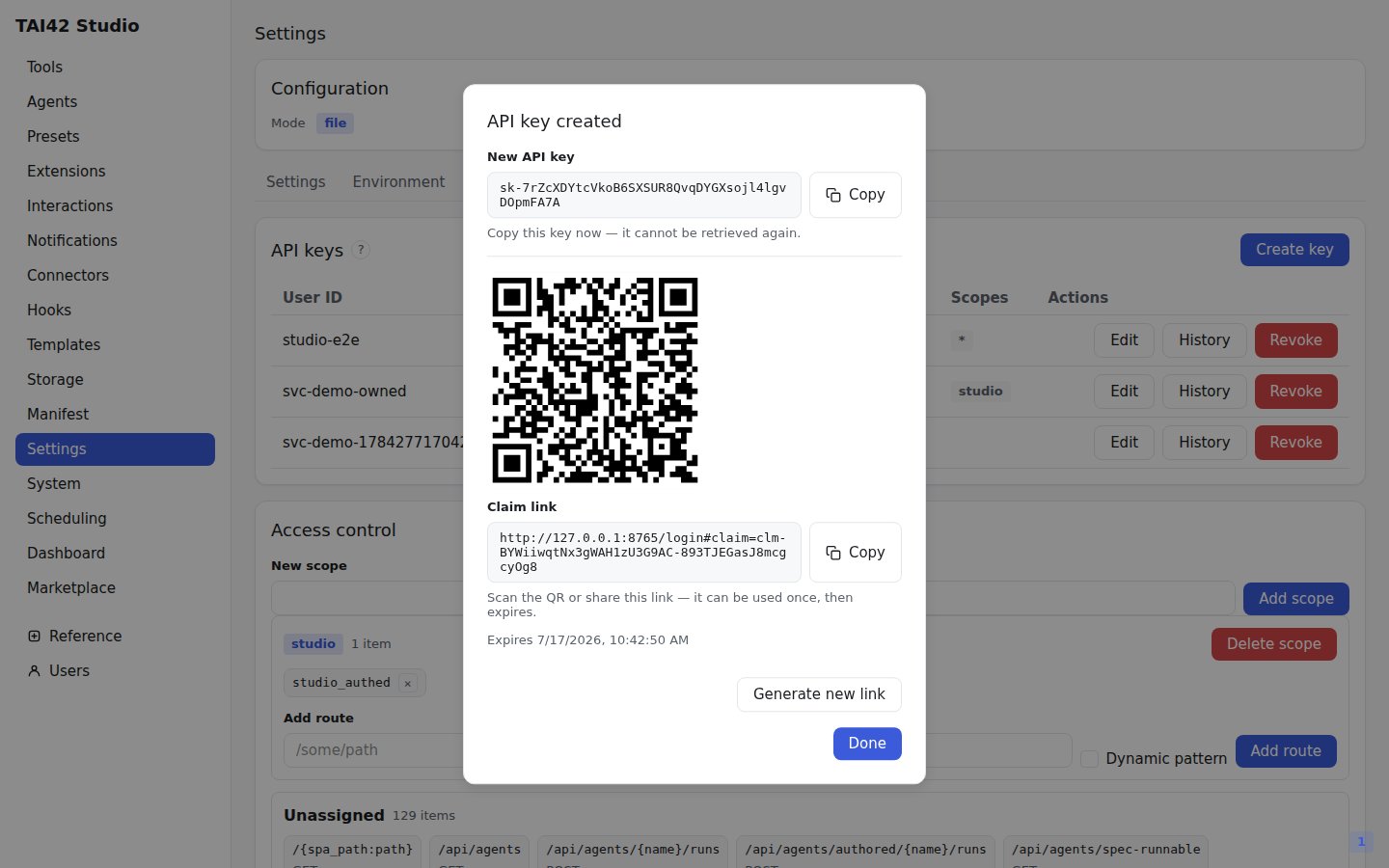
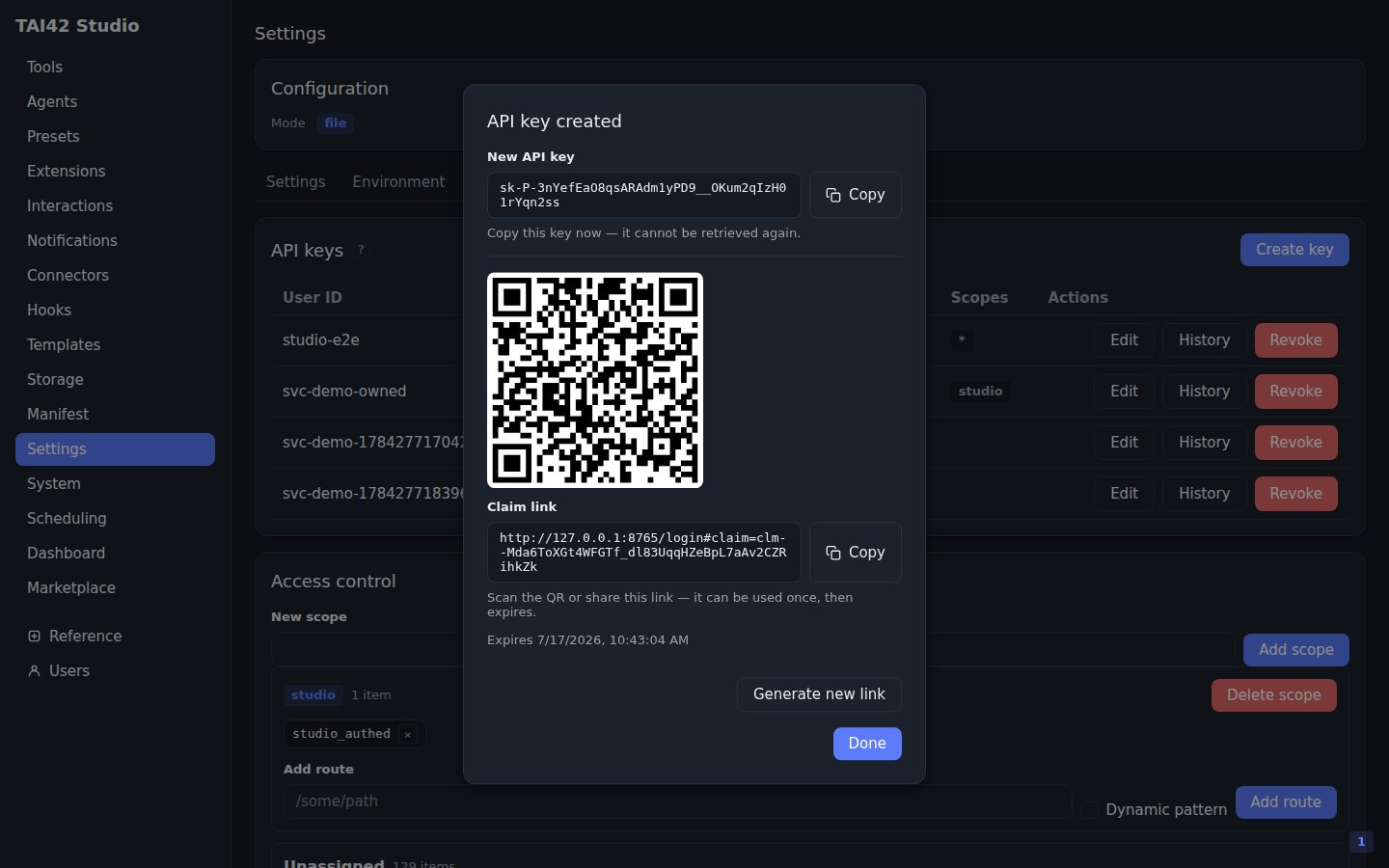
The create dialog is also where you hand a freshly minted key to another device
without ever putting the secret in a URL. The moment a key is created its raw
`sk-…` value is shown once, and the dialog offers a **Create claim link (QR)**
step: it turns that raw key into a one-time, short-lived
[claim link](/concepts/owned-keys#access-channels) and renders it as a QR code.
Scanning the code opens the [sign-in page](/studio/login) on the other device,
which exchanges the claim token for the key and signs in — the token rides the
URL fragment and burns on first use, so the credential never reaches a server
log.
 The claim-link step lives **only** in the mint dialog, never as a per-row action
on an existing key. Keys are stored hash-only — the server keeps a hash, never
the raw secret — so the plaintext key that a claim link must carry exists only in
the moment right after creation. There is no way to regenerate a claim link for a
key already in the table; mint a new key instead. See the
[owned-keys guide](/guides/owned-keys) for the full claim flow, including the
`tai auth claim` and CLI legs.
See [access control](/concepts/access-control) for the jq policy model behind
scoped keys, [owned keys](/concepts/owned-keys) for the delegation model, and the
[CLI reference](/reference/cli/keys) for provisioning keys from a terminal.
The claim-link step lives **only** in the mint dialog, never as a per-row action
on an existing key. Keys are stored hash-only — the server keeps a hash, never
the raw secret — so the plaintext key that a claim link must carry exists only in
the moment right after creation. There is no way to regenerate a claim link for a
key already in the table; mint a new key instead. See the
[owned-keys guide](/guides/owned-keys) for the full claim flow, including the
`tai auth claim` and CLI legs.
See [access control](/concepts/access-control) for the jq policy model behind
scoped keys, [owned keys](/concepts/owned-keys) for the delegation model, and the
[CLI reference](/reference/cli/keys) for provisioning keys from a terminal.