> ## Documentation Index
> Fetch the complete documentation index at: https://docs.tai42.ai/llms.txt
> Use this file to discover all available pages before exploring further.
# Sign in
> Sign in to the Studio with a login method, an invite, or an API key.
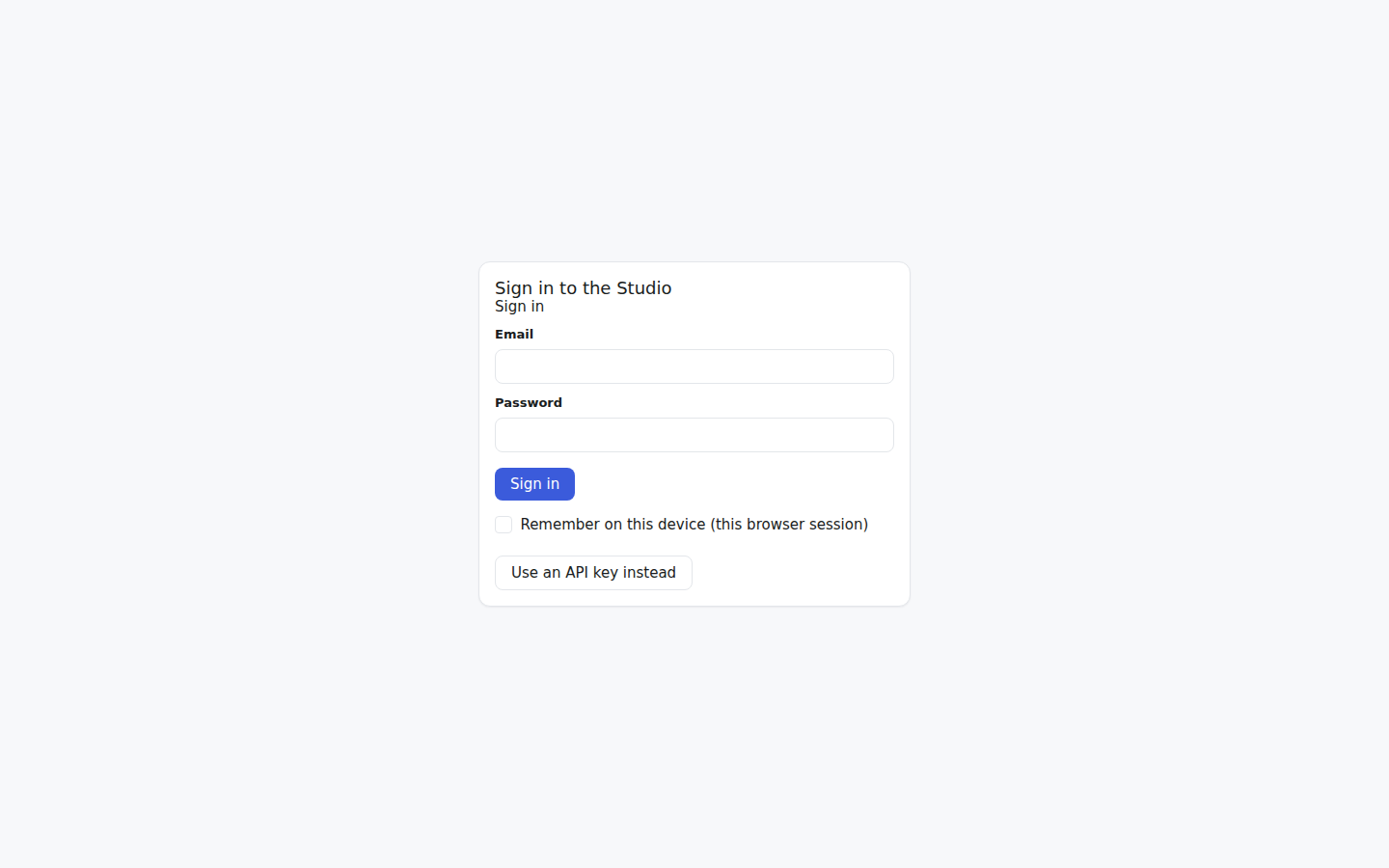
The Studio's sign-in screen is **metadata-driven**. It asks the server what
login methods it offers and renders exactly those — a password form, a sign-in
button, or both — with an API-key field always reachable as a fallback. A server
with no [accounts](/concepts/accounts) provider shows only the key field; a
server with one shows the human login flows its provider declares.
 ## Sign-in methods
The screen reads the server's public login-methods listing and draws one control
per declared method:
* A **credentials form** — the provider names the fields (for example email and
password) and the route to post them to. Submitting mints a session and lands
you on the screen you were headed for.
* A **redirect button** — a single button that navigates to a provider's sign-in
flow (for example an OIDC authorize route). The provider owns the round trip;
the callback returns a session.
Because the methods are data the provider declares, the login screen never
hard-codes a specific auth scheme — swapping or adding a provider changes what
the screen renders, with no Studio change.
## First-run owner
On a fresh deployment there are no accounts yet, so the login listing reports a
**bootstrap** state and the screen shows a one-time **owner-creation** form
instead of a normal login. Completing it creates the initial admin — the owner —
and the bootstrap form disappears the moment the owner exists. From then on the
screen shows the ordinary sign-in methods.
## Invites
An admin grows the user set from the [users-admin
page](/studio/admin-console). An invited person opens their invite link, which
carries an invite token; the login screen recognises the token and shows a
**set-your-password** form that activates the account. Invites are single-use and
time-bounded — an expired or already-used invite is refused.
## Claim links
A [claim link](/concepts/owned-keys#access-channels) is how an
[owned key](/concepts/owned-keys) reaches a new device without the raw secret
ever travelling in a URL. The link has the shape `/login#claim=` —
the token rides the URL **fragment**, so it is never part of the request URL and
never reaches a server access log. When the sign-in screen loads with a `#claim=`
fragment, it
recognises the token, exchanges it once at the always-public
`POST /api/login/claim`, receives the raw key, and signs the Studio in with it —
the same held-in-the-browser session the key field produces, with no typing.
The exchange is **one-time and time-bounded**: the token burns on first use and
carries a short TTL. A token that was already claimed, is unknown, or has expired
all fail the same way — the screen reports the claim link as no longer valid and
falls back to the ordinary sign-in controls. The failures are deliberately
indistinguishable, so a stale link gives no signal an attacker could probe; when
one fails, mint a fresh key and a fresh claim link. Claim links are created in
the [API-keys](/studio/api-keys) create dialog (or via
[`tai keys claim-link`](/reference/cli/keys)).
## API-key fallback
The **API-key** field is always available, behind an *"Use an API key instead"*
toggle when login methods are present. Pasting a deployment key signs the Studio
in exactly as it always has — the key is held in the browser and sent on every
request. This path is permanent: it is how an operator reaches a server that has
no accounts provider, and how the headless, machine-key path stays usable
alongside human login. See [API keys](/studio/api-keys) for provisioning keys.
## Deploy notes
To turn on human login, a deployment enables an accounts provider and lists it
in the auth-provider chain:
* Add the accounts provider's module to the server's lifecycle and router
modules so its login routes and session validation are mounted.
* Include the provider in `ACCESS_CONTROL_AUTH_PROVIDERS` — the ordered
[auth-provider](/concepts/access-control) list the gate resolves credentials
against — so its sessions are validated.
* Apply the accounts plugin's own schema as its README describes. A
Postgres-backed provider ships its own migrations/DDL and documents how to
apply them in its repository; run that step per the plugin's own
instructions.
The concrete settings, schema, and apply steps for a specific accounts provider
live in that plugin's own repository README — this page covers the
skeleton-side wiring that every accounts provider plugs into.
## See also
* [Accounts](/concepts/accounts) — the session, ownership, and role model behind
sign-in.
* [Access control](/concepts/access-control) — multi-provider resolution and the
public login namespace.
* [API keys](/studio/api-keys) — the key fallback and owned credentials.
## Sign-in methods
The screen reads the server's public login-methods listing and draws one control
per declared method:
* A **credentials form** — the provider names the fields (for example email and
password) and the route to post them to. Submitting mints a session and lands
you on the screen you were headed for.
* A **redirect button** — a single button that navigates to a provider's sign-in
flow (for example an OIDC authorize route). The provider owns the round trip;
the callback returns a session.
Because the methods are data the provider declares, the login screen never
hard-codes a specific auth scheme — swapping or adding a provider changes what
the screen renders, with no Studio change.
## First-run owner
On a fresh deployment there are no accounts yet, so the login listing reports a
**bootstrap** state and the screen shows a one-time **owner-creation** form
instead of a normal login. Completing it creates the initial admin — the owner —
and the bootstrap form disappears the moment the owner exists. From then on the
screen shows the ordinary sign-in methods.
## Invites
An admin grows the user set from the [users-admin
page](/studio/admin-console). An invited person opens their invite link, which
carries an invite token; the login screen recognises the token and shows a
**set-your-password** form that activates the account. Invites are single-use and
time-bounded — an expired or already-used invite is refused.
## Claim links
A [claim link](/concepts/owned-keys#access-channels) is how an
[owned key](/concepts/owned-keys) reaches a new device without the raw secret
ever travelling in a URL. The link has the shape `/login#claim=` —
the token rides the URL **fragment**, so it is never part of the request URL and
never reaches a server access log. When the sign-in screen loads with a `#claim=`
fragment, it
recognises the token, exchanges it once at the always-public
`POST /api/login/claim`, receives the raw key, and signs the Studio in with it —
the same held-in-the-browser session the key field produces, with no typing.
The exchange is **one-time and time-bounded**: the token burns on first use and
carries a short TTL. A token that was already claimed, is unknown, or has expired
all fail the same way — the screen reports the claim link as no longer valid and
falls back to the ordinary sign-in controls. The failures are deliberately
indistinguishable, so a stale link gives no signal an attacker could probe; when
one fails, mint a fresh key and a fresh claim link. Claim links are created in
the [API-keys](/studio/api-keys) create dialog (or via
[`tai keys claim-link`](/reference/cli/keys)).
## API-key fallback
The **API-key** field is always available, behind an *"Use an API key instead"*
toggle when login methods are present. Pasting a deployment key signs the Studio
in exactly as it always has — the key is held in the browser and sent on every
request. This path is permanent: it is how an operator reaches a server that has
no accounts provider, and how the headless, machine-key path stays usable
alongside human login. See [API keys](/studio/api-keys) for provisioning keys.
## Deploy notes
To turn on human login, a deployment enables an accounts provider and lists it
in the auth-provider chain:
* Add the accounts provider's module to the server's lifecycle and router
modules so its login routes and session validation are mounted.
* Include the provider in `ACCESS_CONTROL_AUTH_PROVIDERS` — the ordered
[auth-provider](/concepts/access-control) list the gate resolves credentials
against — so its sessions are validated.
* Apply the accounts plugin's own schema as its README describes. A
Postgres-backed provider ships its own migrations/DDL and documents how to
apply them in its repository; run that step per the plugin's own
instructions.
The concrete settings, schema, and apply steps for a specific accounts provider
live in that plugin's own repository README — this page covers the
skeleton-side wiring that every accounts provider plugs into.
## See also
* [Accounts](/concepts/accounts) — the session, ownership, and role model behind
sign-in.
* [Access control](/concepts/access-control) — multi-provider resolution and the
public login namespace.
* [API keys](/studio/api-keys) — the key fallback and owned credentials.