

1
Find the plugin ref
Every listing is addressed as
namespace/name. Find it with
search — tai plugins search uuid names the listing
that ships the item you want.2
Install
--version (or a version field in the body); with no
version the server resolves the newest version compatible with the core it
is running — a core-aware pick, so an install never lands a version your
running core cannot load. A version you pin explicitly is still checked
against the server’s installed tai42-contract — one that does not fit refuses
to install, and the error names the mismatch.3
Verify
tai tools, its extensions under tai extensions.What install does
- Resolves the ref against the registry — with no pinned version, the newest version compatible with the server’s installed tai42-contract (core-aware resolution) — and checks advisories. A version that does not fit the contract, one that is killed, or one under a non-withdrawn critical advisory refuses before anything changes.
- Builds the resolved version’s environment beside the one in use, then
switches to it. An in-process plugin rebuilds the shared plugin layer with it
added; an
mcp-serverpackage builds its own environment. Either build runs under the image’s constraints and refuses with a409when the plugin’s dependencies conflict with the installed plugins or the image. By source: a GitHub-sourced plugin downloads the release tarball, verifies its SHA-256 against the digest the registry recorded at ingest, keeps that verified file underTAI_PLUGINS_DIR/artifacts, and installs only it — a re-pointed tag is refused; a PyPI-sourced plugin pins the exact version (package==version) and relies on PyPI’s file immutability for that version. - Patches the server manifest once per provided item — a
tool module lands under
tools, an extension module underextensions_modules, and so on, exactly as the plugin’stai-plugin.ymldeclares. - Reloads the server, records the marketplace ref and version locally, and deletes the builds no longer in use.
tai plugins upgrade --all and tai plugins rebuild
hold one fleet-wide lock, so two never run at once: a second one is refused at once
(over HTTP, a retriable 503). An install, update or uninstall holds the lock
exclusively while it changes the plugins directory, the install store and the
manifest. When its change restarts workers, it then holds the lock shared for that
restart roll: a restarted worker checks its plugin environments at boot under the
shared lock, so it verifies the finished change and joins the fleet, while a second
operation is still refused until the roll ends.
Registry-dispatched items — tools, agents, extensions, storages, and a channel’s
registration and outbound delivery — are live the moment that reload lands, and
so are the HTTP surfaces. A router or middleware plugin, and a Tier-2
channel’s inbound webhook route, come live on the next reload / config-apply: the
epoch rebuild re-imports the
plugin package and its route-sibling modules and re-registers the declared routes,
so a route-carrying plugin is serving on the same reload as the rest — no full
process restart required (Tier-1 confirm/external channels register no inbound
route). See
self-hosted upgrades.
A packaged install writes the plugins directory (
TAI_PLUGINS_DIR) and the
manifest, and refuses until TAI_PLUGINS_DIR names a writable directory. On a
self-hosted deployment, keep both on persistent storage — the plugins directory
and the manifest file — so a container recreation does not drop the plugin. See
the persistent mounts.Provide required environment
Some plugins need environment values to run — an MCP server’s!ENV markers, an
OAuth connector’s client id and secret. The server
decides what a given install requires: the install preview computes the listing’s
required_env — each variable as {name, secret} — and the missing_env still
absent from this server’s environment. Every surface reads that one server-computed
answer; none of them re-derives it.
- CLI —
--env KEY=VALUEsupplies a value, and it is the only flag that carries a value.--secret KEYis a bare mark (a key, no value) that keeps that key masked in the environment and out of logs; a value you want hidden is still passed with--env KEY=VALUEand additionally marked with--secret KEY. A connector’s client secret is auto-marked, so the mark is optional there. Both flags are repeatable. - Studio — the install dialog lists the missing variables, prompts for them,
and seeds each secret toggle from
required_env, so you fill exactly what the server says is missing.
400 naming the key: the deployment’s value wins at every
boot and reload, so change it in the deployment’s environment and restart (see
deployment values and stored values). An
install that would leave a required variable unresolved is refused before
anything is written, and the error names the variables. --dry-run shows the
delivery and the required env without installing.
Mount the routes
A plugin that mounts HTTP routes — arouter item, or a channel with an inbound
webhook — declares them relative to a
base prefix, and install is where you see the resulting absolute paths, remap the
prefix if you want, and accept any route the plugin serves without a credential.
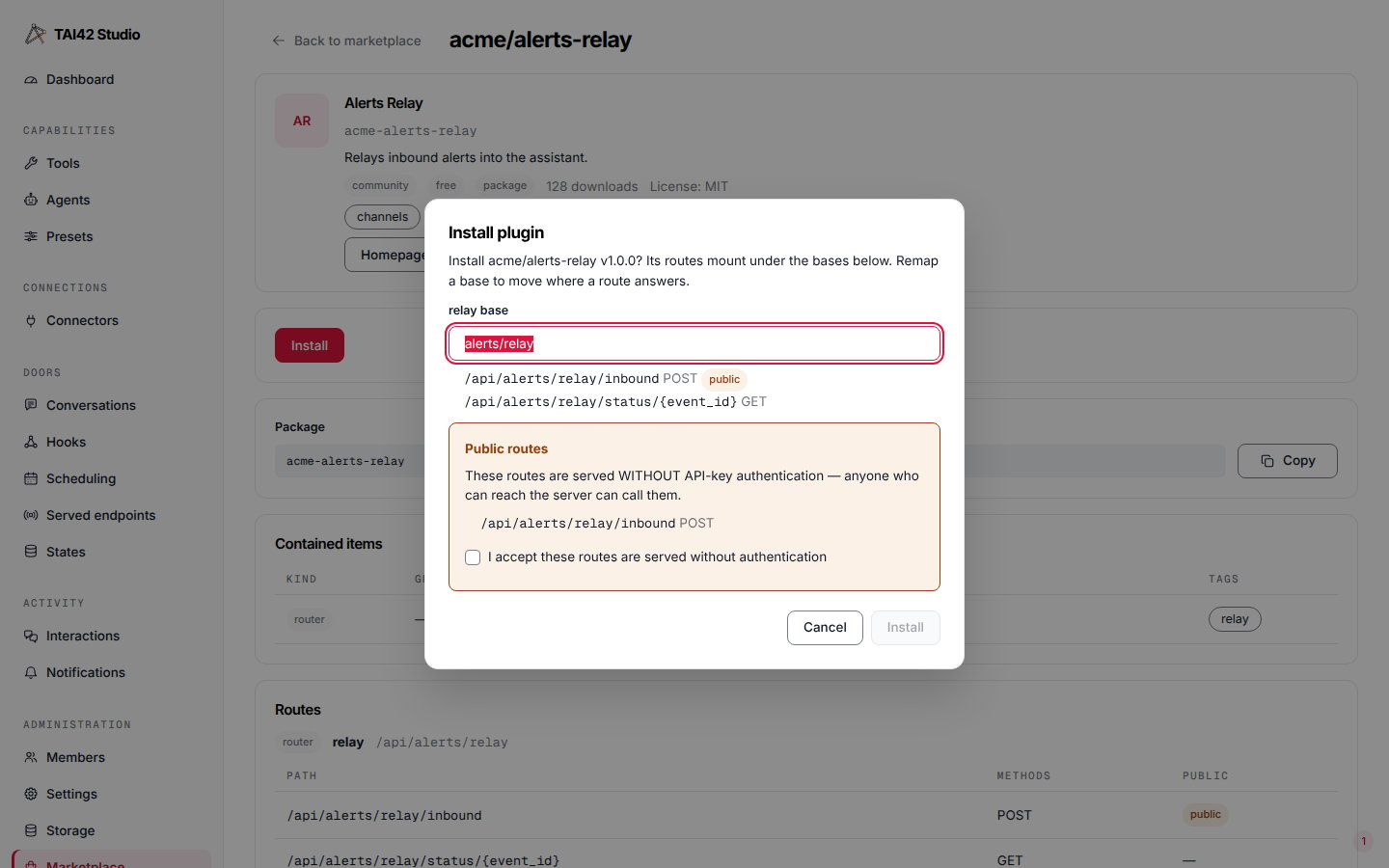
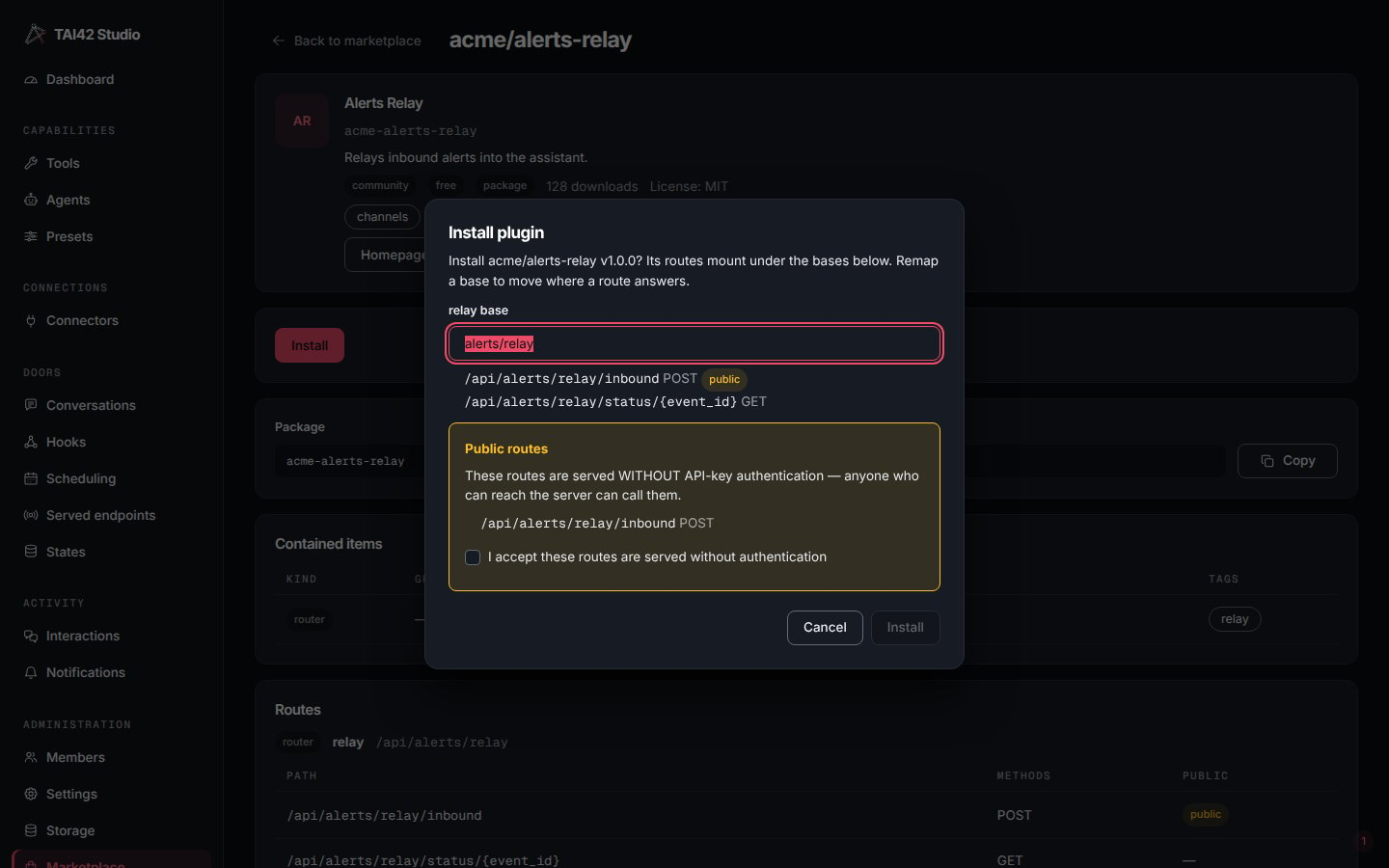
The Studio install dialog: each route resolved to its full path, a per-item base to remap the prefix, and the acceptance checkbox for the routes served without authentication.
/api/... path, flags which are public,
and lists any collision with a route the core or an already-installed plugin owns.
--dry-run prints that table and exits non-zero if anything collides.
Remap the base. Every route-carrying item mounts under a default base; move it
with --mount item=base (repeatable), or a route_mounts object in the body. The
whole item’s routes shift together — only the base moves, never the /api/ root
or a route’s own path:
public answers
without authentication — an inbound webhook has to. Install refuses until you
say so: without acceptance it returns 400 PUBLIC_ROUTES_NOT_ACCEPTED and lists the
routes, so opening an unauthenticated door is always a deliberate step. Accept with
--accept-public-routes (or "accept_public_routes": true). On an update, only
a route that is newly public — not one you already approved on the installed
version — needs accepting again.
The install receipt returns the mounted routes — each item, full path, methods, and
public flag — so you can confirm what opened where.
A collision is a remap
Two plugins can never own the same route. If a plugin’s resolved paths clash with a route the core or another installed plugin already owns, install stops with409 ROUTE_COLLISION and names the clashing paths; nothing is installed. The remedy
is to remap the colliding item onto a free base and install again:
base
alongside the install record, so a reload or a container recreation brings every
route back up at the same path — a remapped route stays remapped, with no re-entry
of the mount. Keep the install record and manifest on
persistent storage so a recreated
container does not lose them.
Update
tai plugins installed shows update availability per plugin; update resolves
the new version and runs the same install flow. Pin a target with --version,
or omit it for the latest. An update keeps each MCP entry’s include / exclude
(the tool selection) and replaces every other key of the entry with the new
version’s.
To move the whole installed roster onto versions compatible with the running
core in one step — the flow after a self-hosted image upgrade:
Uninstall
mcp-server package, its environment
withdrawn. It then strips the plugin’s entries from the manifest and reloads the
fleet onto the stripped manifest, deletes the install record, and finally deletes
the builds no longer in use (a server package’s whole environment). A failed
reload or record delete switches the environment back and raises; a manifest
change that already landed stays, and re-running uninstall completes the removal.
An unknown ref refuses with <ref> is not installed. The receipt’s
manifest_written says whether the manifest was written.
With --offline, uninstall runs on the deployment host with no server, and the
next server start loads the result. It is the way out when a plugin keeps the
server from starting — see
A plugin that blocks the upgrade.
From the Studio
The Marketplace screen’s plugin detail offers the same install, update, and uninstall actions with progress surfaced in place — it drives these routes. Each result shows the fleet report and the worker recycle report. Installing, updating, uninstalling and upgrading all need an administrator: any other session sees a line naming the route in place of the button. The Connectors screen installs a listing inside its Connect step.See also
- Browse and search — find the ref.
- Advisories — what a killed version means.
- The manifest — what the patch touches.