

The provider seam
Config is a pluggable-provider feature. The skeleton ships the selection seam — a config mode, its settings, and a factory that maps a mode to a provider module — and the default file provider. The active mode is chosen withTAI_CONFIG_MODE
(file by default). The factory loads the selected provider by dynamic import and
builds its manager:
build_config_manager() convention. The factory needs nothing but the mode and the
module; the consuming code never knows which provider is behind the manager.
Secrets are referenced, not embedded
A sensitive value is referenced by the name of the environment variable that holds it, not by value — the runtime reads it from the environment at use time, so a file that is edited, versioned, or displayed never contains the credential itself. The reference takes one of two shapes, by where it sits:- A scalar value written
!ENV ${VAR}is the convention wherever a secret rides as a plain string leaf — a manifest value, a Studio secret field, and a preset’s bakedfixed_kwargs. The runtime keeps the marker verbatim and resolves it from the environment at use time; the!ENV ${VAR:default}form falls back todefaultwhen the variable is absent. The StudioSecretRefFieldand MCP-tab secret flow write this marker for a pasted secret automatically (see Settings profiles). - A
secret_envfield carries the env var name where the binding is a config object rather than a scalar — a hook or webhook verifier binding namessecret_env, and an OAuth connector provider aclient_secret_env.
How a config change is written
Every change to the manifest or env — a tool reload, a manifest replace, a live env edit — runs one mutation pipeline: validate the resulting config, persist it transactionally, reload the calling process, then broadcast on the worker bus. Persisting before reloading is why the persisted config and the live config cannot drift apart through a supported path — the running state is always what is on disk. Two guarantees hold across every provider:- Transactional writes. Every config write runs inside the provider’s
exclusive_write()span, held from the first read through the persist. A provider must block until the write is exclusive across every process sharing the store and within the holding process itself, so two spans over one store are never held at once. It must release the span when the holding process dies, and must raise rather than let a write proceed unserialized. A release the provider cannot complete raises from the span’s exit; the writes made inside the span stand, the write’s reload and broadcast still run, and the store may still hold the span until the holding process dies — the response’sspan_release_errorand an ERROR log carry the provider’s error. The span is entered and exited on worker threads, and the exiting thread may differ from the entering one, so a provider must not bind the span to the thread that entered it. Thefileprovider takes a POSIX record lock on.config-write.lock(mode 0600) in the config directory, plus a process-local lock, since a record lock does not exclude its own process; it is not supported on Windows. - Comment preservation. A manifest edit keeps the surrounding comments, key order, and formatting of the untouched document. An automated edit does not reflow a file a human maintains by hand.
Deployment values and stored values
A server takes its env from two places: the deployment’s environment — the process environment it starts with, such as a Composeenvironment: entry, a
Kubernetes pod env value, or an exported shell variable — and the stored env,
which the admin edits through the app. In file mode the stored env is the .env file
in the config directory. Each tai entry point first loads the .env file that
python-dotenv’s search finds — upward from the folder of the starting tai code, or
from the working directory when run interactively or under a debugger — into the
process environment, so its keys are deployment values; it never loads the config
directory’s stored .env this way: when the search lands on that file, it logs a
WARNING naming it and skips it, and the server applies the stored env itself. A .env
that names its own folder as the config directory while the process environment sets
none is refused at startup, naming the file: the config directory is a deployment value,
set in the environment, never in the stored env. Settings also read the .env file in the working
directory as a source of their own (see the
resolution order), but in file mode never the
stored .env, even when the working directory is the config directory, as in the
shipped image (/app): a stored key reaches a setting only through the process
environment the server applies the stored env to. The FASTMCP_* settings of the
FastMCP framework the server runs on follow the same rule in every process that runs the
app — the tai serve workers, tai backend and the stdio server: FastMCP reads them
when it loads, and the process reads them again, without the stored .env, once it has
applied the stored env. Every other tai process — the tai serve parent, tai metrics
and the client commands — runs no app and keeps FastMCP’s own read at load, which takes
the .env that FASTMCP_ENV_FILE names (the working directory’s by default), so in
file mode it can read the stored .env. An embedded app leaves
FastMCP’s settings as the host process set them. FastMCP’s settings are a reader of the
applied env like the server’s own settings, so a FASTMCP_* setting the deployment sets is
the deployment’s under every name FastMCP reads for it: a deployment that sets
FASTMCP_DOCKET_URL owns FASTMCP_DOCKET__URL and the docket’s JSON name
FASTMCP_DOCKET too.
The deployment’s value wins. A key that any app process of the deployment — a
serve worker or a backend runtime — starts with set to a non-empty value belongs to
the deployment, for the whole deployment: the stored env is one for every process, so
Studio shows the key locked, no save sets it, and no process on the same
worker bus applies a stored copy of it, including a process whose
own environment does not carry the key. While two skeleton majors share one Redis and bus namespace,
this holds per major: each judges by its own major’s workers
(two fleets). A process learns what the other processes’
environments set from the bus it reaches (see below): a process with no bus, or one that a
stored copy of the bus Redis URL or of TAI_BUS_NAMESPACE points at another bus, learns
none of their names, judges by its own environment alone, and runs apart from the
fleet. A process the
deployment did not give the value runs what it would run with no stored copy: the
TAI_DEFAULT_* fallback when one is set, otherwise the field’s code default. At boot
and at every reload, the deployment’s value wins over a stored value for the same key:
the stored copy is ignored, and each apply logs one WARNING naming the ignored keys
(names only, never values). A stored empty value for such a key is skipped the same
way, so the deployment’s value stays. Env names are read case-insensitively, so a key
belongs to the deployment under every spelling of its name. A settings field that the
deployment sets under any name that sets it belongs to the deployment under all of them:
its accepted env names, the JSON name of a nested group that holds it (HOOKS_REDIS sets
every field of the hooks Redis connection, HOOKS_REDIS_URL among them), and, in a group
that reads nested names, its delimited names (TAI_RATE_LIMIT_REDIS__REDIS_URL sets
TAI_RATE_LIMIT_REDIS_URL). A deployment that sets a group’s JSON name owns every field of
the group. A TAI_DEFAULT_*
fallback is not one of a field’s names: a deployment that sets only the fallback owns
that fallback name (a save that sets it is refused), and the field stays the admin’s.
The field’s own name can still be stored, and the stored value then wins over the
fallback. Every other key belongs to the admin, and the app stores it.
A save cannot set a deployment value. A write that sets a deployment-owned key to
a new value is refused with a 400 that names the keys, and nothing is written. This
holds on every env write: an env edit (POST /api/config/env, tai config env set,
its MCP tool, the Studio editor), a profile apply, a secret env write, a marketplace
install or revert, and a backup import. It holds on a profile save too, so a profile
that could never be applied is never stored. A write may remove a stored copy of such a
key, since the copy has no effect, or carry it with its stored value unchanged.
Neither counts as a change: it rolls no recycle, and it is allowed for the bus URL too.
GET /api/config/env (tai config env get) names the stored keys the deployment sets
under deployment_keys. tai config profile diff lists the deployment-owned keys a
profile sets to a new value under refused_keys. To change a deployment value, change
it in the deployment’s environment and restart the process.
One spelling per name. The stored env sets each name under one spelling. A write
whose resulting stored env would set one name under two spellings (TAI_LOG_LEVEL and
tai_log_level) is refused with a 400 naming both, since a process reads only one of
them and two processes could read different ones. To rename a key’s spelling, remove the
old spelling in the same write. A stored env that carries two spellings of one name is
refused at boot and at reload, naming both. To recover, keep one spelling of each such
name: while a process still runs, an env write that removes the other spelling (sets it
to an empty value) is accepted; otherwise edit the stored env directly (the config
store’s .env or the Kubernetes Secret) and start the process again.
How every process learns what the deployment owns. Each process on the
worker bus publishes, on its row of the fleet census, the names its
own environment sets and a description of every settings name it reads: the names and how
they nest, never values. A save, a read of the env or the settings schema, a profile diff,
and a reload each read the census once and judge ownership by the names of every worker in
it, whatever the worker’s state, read through the descriptions of every worker in it. So a
name only one worker’s settings read (a plugin installed on one worker, a worker on another
image of the same skeleton major) is owned the same on every worker of that major, and they
all own the same fields. The census holds the workers of one skeleton major only, so the
workers of another major running on the same bus namespace
(two fleets) judge ownership
by their own major’s names and descriptions. A worker
on the census whose description the bus no longer holds fails the operation, naming the
worker. When the bus cannot answer, the operation judges by the fleet’s names and
descriptions as the worker last read them and logs a warning; it is never refused for
that. A worker that joins the bus, receives a
join announcement, or reconnects reads the census and, when it cannot, fails that step
loudly and retries on its next connect. A server with no bus is a deployment of one
process. At boot a process applies the stored env, reads the census on the worker bus
that env configures, and withdraws every stored copy of a key another worker’s deployment
sets before it reads the manifest or builds anything but the bus, so no such copy is
ever bound or built into a resource; the withdraw logs a WARNING naming the keys. A process that
reaches the bus only through a stored copy of a key that locates it (the bus Redis URL,
TAI_BUS_REDIS_URL or TAI_DEFAULT_REDIS_URL, or TAI_BUS_NAMESPACE) while another
worker on that same bus has its deployment set that key cannot stay on that bus and cannot
run without it: it refuses to start, naming the keys. Set them in that process’s
environment too, or in no worker’s. A stored copy that points the process at another bus is
not refused: the census of that bus holds none of the fleet’s workers, so the process
never learns that a worker’s deployment sets the key, and it runs on that other bus, apart
from the fleet. When the bus cannot answer at boot, the process judges by its own environment,
logs a warning, and corrects itself when it joins; a join, a join announcement or a
reconnect whose withdraw itself moves the bus settings off the bus the process is a member
of (a key that locates it was a withdrawn copy) ends the process with an ERROR naming the keys, and the supervisor’s restart meets the
boot refusal. When it joins, it withdraws every applied stored key that another
worker’s deployment sets, then announces its join, and every other worker withdraws the
stored keys the newcomer’s names make owned. A withdrawn key returns to that process’s
own deployment value, or is dropped when its environment does not carry the key, and
the withdraw logs a WARNING naming it. A worker that withdraws a key on joining, on a
join announcement, or on a reconnect rebuilds its serving generation, and a backend
runtime turns its pool over. A recycle-class key it still runs on
is recycled: the worker that joined rolls that recycle over the workers that reported
such a key, one at a time, and recycles itself last when its own withdraw left one and
the roll converged, under the supervisor, as every recycle. A worker that does not
confirm the announcement is sent a config reload once it is ready, and restarted unless
its reply confirms it clean or states a refused build (see How a recycle runs
below). A worker
that is away from the bus — between its exit and its return in a recycle, or scaled
down — publishes no names while it is away, so a save may then set a key only that
worker’s environment sets; when it returns, that stored value is ignored, listed under
deployment_keys, and can be removed.
Where a value comes from. GET /api/config/settings-schema reports each field’s
current value and its value_source:
The value is the one the worker that answered the request runs: for a
deployment
field its own environment’s value, or, when only another worker’s environment sets the
field, its TAI_DEFAULT_* fallback or the field’s code default. Workers publish the
names they own, never values, so the schema never shows another worker’s value.
Studio shows a deployment field read-only, marked Set by the deployment — see
Settings and environment.
Run under a supervisor. The server must run under a supervisor that starts a
process again when it exits — a Compose restart policy, Kubernetes, or systemd. A
recycle-class change relies on it: the affected processes exit
gracefully, and the supervisor starts them again under the new env. Without a
supervisor, an exited process stays down, and the roll reports the target where it
stopped.
Settings profiles
A settings profile is a named, versioned snapshot of the whole profile-managed env band — its env map, the per-key secret marks, and a description — kept in the same versioned-document store as presets. Applying a profile replaces the stored env with its band in one shot: a key the profile does not name is dropped (except the launcher-set excluded band, which is carried; see the reload classes below), so a profile is a whole environment you switch to, not a patch you layer on. The profile’s secret marks are written with it, so a key it marks secret stays masked once applied. Drive it from the CLI: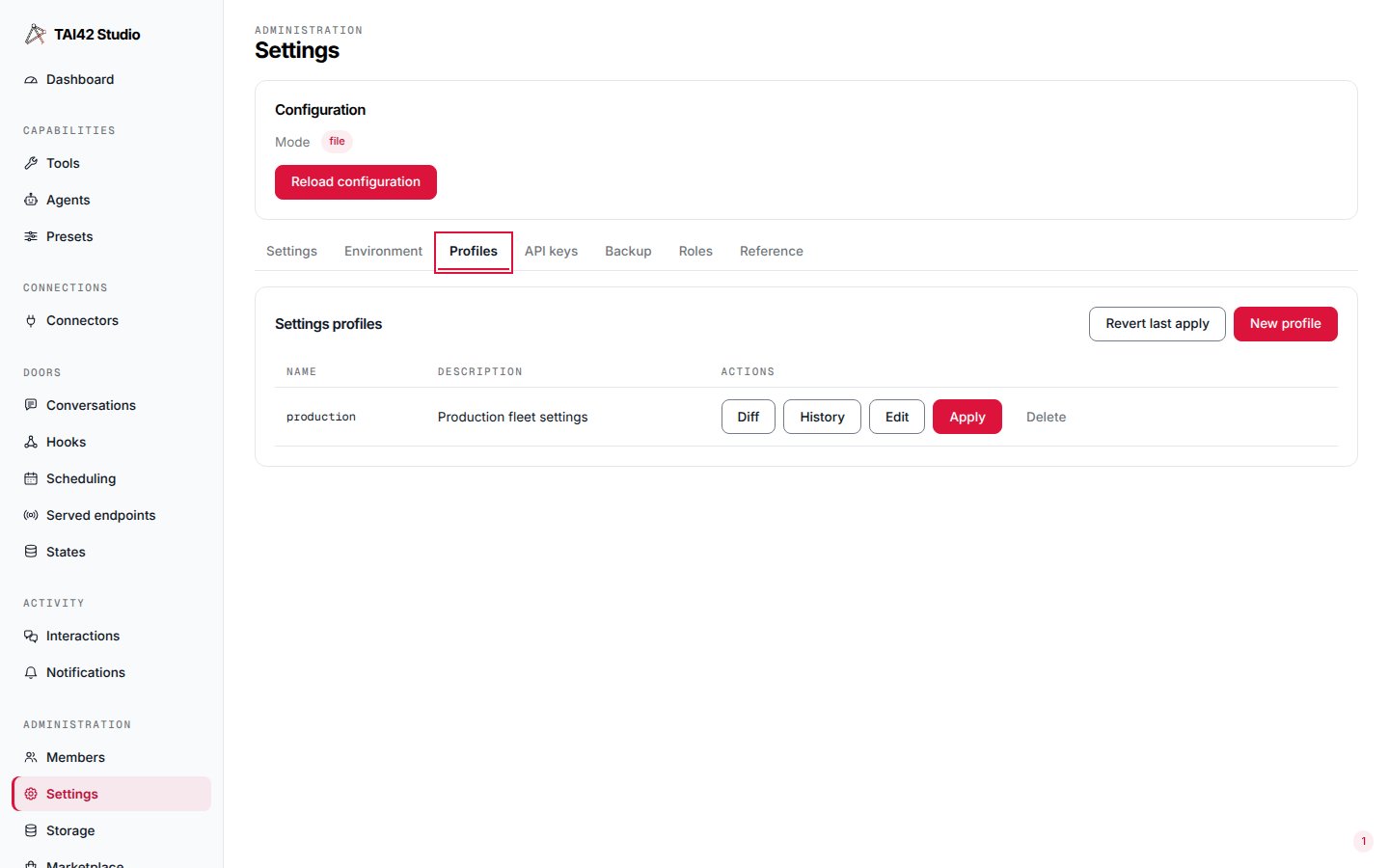
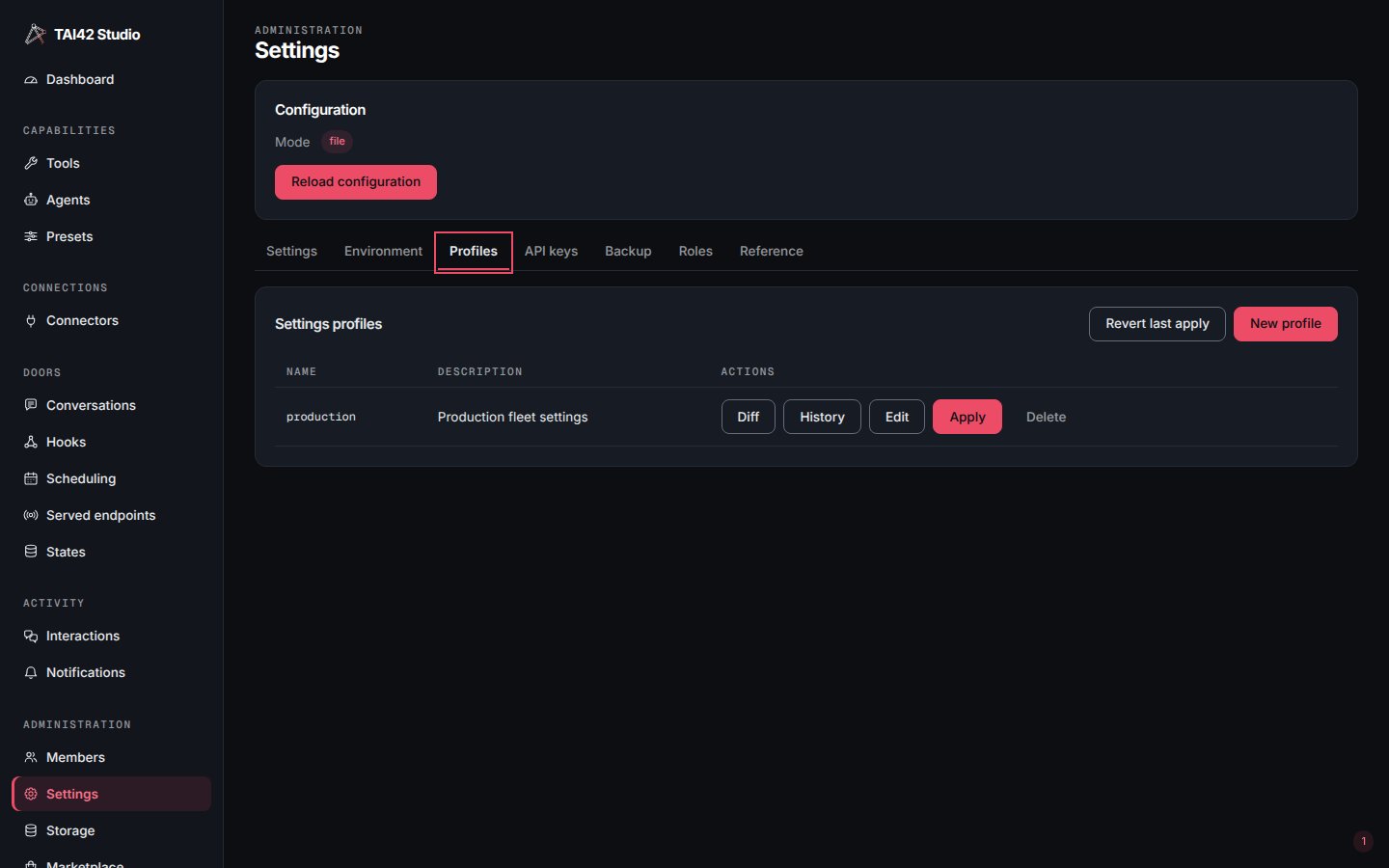
The Profiles tab: a saved profile's env band, with its secret-marked key masked.
!ENV references follow the profile. A profile switches the
profile-managed env band, not the manifest document, so what a profile can switch
inside the manifest is exactly its !ENV references. A manifest value written as
an !ENV ${KEY} reference resolves against the effective env at reload — switch to
a profile that changes KEY and the value resolves differently. An inline
(literal) manifest value is baked into the manifest document, not the env band, so
no profile touches it and it is not switchable. This is why the Studio
SecretRefField / MCP-tab secret flow writes an !ENV reference automatically: a
pasted secret is stored under a generated env key and the manifest gets the marker,
never the plaintext — so a secret is
referenced, not embedded, stays masked, and
stays profile-switchable.
Stored env applies at boot, before anything resolves. Every serving process
applies the stored env — the config store’s .env or the Kubernetes Secret — to
its environment at boot, before the manifest resolves, by the same rule as a reload:
a key the deployment sets keeps the
deployment’s value. So an !ENV ${KEY}
marker resolves to its stored value on a cold boot, not only after a later reload. A
marker whose variable is set in neither the deployment’s environment nor the stored
env resolves to a sentinel, and boot emits one loud warning naming the dangling
variables.
Reload classes. Every setting carries a reload class, surfaced in the
settings reference. Every env write — a profile apply, an env
edit (tai config env set, the Studio editor), a backup import, and the marketplace
and MCP-secret writes — diffs the env it would store against the stored one and
classifies each changed key by its class; a key re-sent unchanged is not a change:
- hot — re-read in place on the next serving generation. The common case; no resource is torn down.
- recycle — the pooled resource behind the key (a Redis or broker connection,
the bus) must be torn down and rebuilt, which needs the
supervisor that starts the affected
process again. Every env write rolls that recycle across the fleet (see How a
recycle runs below). A recycle-class value changed in the stored env outside these
writes (a hand edit of
.env, akubectl editof the config Secret) is named by the next reload — each worker’sawaiting_respawn— and that reload (a config reload, or the fleet soft restarttai fleet reload-config) rolls the same recycle over the workers that name it, all but those whose restart it withholds (see How a recycle runs below). A worker compares each recycle-class value with the one it bound — at boot, or when the plugin that declares the setting was loaded — so a plugin loaded after boot with its value already in place awaits nothing. A stored recycle-class value a worker withdraws when another worker’s deployment turns out to set the key is rolled as a recycle by the worker that joined (see How every process learns what the deployment owns above). The response of an env write or a profile apply names underawaiting_respawnthe workers (name and keys) still awaiting a respawn after its roll — withheld workers included — empty when no worker is left owing one, and when the roll was handed off (roll_deferred, below). - excluded — deployment / boot identity: the config mode, the transport, the
manifest path, the readiness sentinel, the backend liveness settings (
TAI_BACKEND_LIVENESS_PATH,TAI_BACKEND_LIVENESS_INTERVAL,TAI_BACKEND_LIVENESS_GRACE), the launcher’s server options (bind, workers, graceful-shutdown timeout). These are set by the launcher and have no live-reload path, so a profile that carries one is refused — at save and at apply — naming the key. The refusal reads the profile’s declared keys, never the effective env, so the applier legitimately carrying the whole excluded band across the replace is not itself rejected. A stored env that carries an excluded-band key is refused at boot and at reload, naming the key.
CONNECTORS_KEK, the KeyMaterial type — is flagged apart from the reload
classes. A profile (or env edit, or backup import) that changes a key-material key
(a new value, or a key that was not stored) is refused — at save and at apply — naming the key and pointing at its rotation
path, because bulk-setting one would silently invalidate every secret the old key
secured. Key material is rotated only through its own controlled path, never set
through a profile. Like the excluded refusal, this reads the profile’s declared keys,
never the effective env, so an applier legitimately carrying the stored key material
across the replace is not itself rejected. For CONNECTORS_KEK that controlled path is
Rotating CONNECTORS_KEK: rotate the key with a
previous-key decrypt ring plus a re-encrypt sweep, so old ciphertext is never bricked.
@previous revert. Every apply first snapshots the stored env that counts into a
reserved @previous profile before it writes, so the last-known-good environment
is always one apply away — tai config profile apply @previous reverts a bad
change. The snapshot holds the stored env that counted before the apply — the stored
keys the deployment does not set — so a revert never sets a deployment value. Names
beginning @ are reserved for these pipeline snapshots; an operator cannot create or
overwrite one, and they are hidden from the profile list.
How a recycle runs. These rules hold on every env write — a profile apply, an
env edit, a backup import — and the roll they describe follows every reload that
names a recycle-class key: a config reload, the fleet soft restart, a worker joining
the bus. A refusal names the keys, and nothing is written:
- The reload’s report decides whom the roll restarts. A worker that reports a
recycle-class key off the value it bound is restarted; a worker other than the writer
whose state the report leaves unknown (its reload did not confirm, it has no row, its
reply carries no
awaiting_respawnlist, or the bus was unreachable) is asked once it is ready, and restarted unless its reply confirms it clean or states a refused build; a worker that confirmed clean is left running. A worker whose reload was refused at its epoch build (the build discarded before its swap) keeps serving its current config, and itsfailedreply carries{"status": "discarded", "awaiting_respawn": [...]}; when it reports keys, its restart is withheld, since the stored config did not build on it and a restart may fail the same way. It is left running, never asked, named inawaiting_respawn, and its own ERROR line says to fix the stored config, or the cause the build error names, before restarting it. A discard that itself failed is no refused build: it leaves the worker’s state unknown. A worker asked once ready that states a refused build with keys is awithheldrow of the roll, which does not stop the roll. The writer, the worker that took the change, is never asked at its own roll: its own reload row is its statement, and when its own state is unknown it needs its own restart. A reload that names its targets decides over those targets only. The roll restarts the workers one at a time: for each it waits the drain the worker announces on its census row as its stop begins (its runtime’s stop phase plus the app’s shutdown bounds, see What a leaving worker announces), plus the start-and-rejoin step (TAI_TOOL_RUNS_SHUTDOWN_DRAIN_SECONDS). - The recycle rebuilds the affected pooled resource, and the response of every env
write — a profile apply,
tai config env set, a backup restore, a plugin install — carries the recycle rows naming which workers recycled. The roll runs inside the change, unless the change hands it off (below), so the response answers once the roll ends. The worker that took the write, only when it needs its own restart and the roll converged, recycles itself after replying (itsself-deferredrow in the recycle rows), through whichever door the write came, when that door runs under no bound: the HTTP response, or a tool call (MCPtools/call,tai tools run, an agent, a preset, a hook run in that worker’s process). The exit is graceful, so the reply finishes before the worker stops and its supervisor starts it again. A background tool run (POST /api/tool-runs) runs on the serve worker that took it, so that serve worker recycles once the run has ended. A change under a bound hands its roll off instead, its writer’s restart included (below). - A change made under a bound fixed before it started hands its roll off instead,
since one worker’s drain alone can outlast the bound. Two bounds count: a backend
job’s budget (every tool a
tai backendworker runs as a job: a tool queued on the backend with anasync_taskbranch or run there with async_taskbranch, a schedule fire, a hook dispatched through the backend, a callback’s tool), and the turn budget of a live caller’s call (MCPtools/call,tai tools run, an agent run, a conversation turn, a preset run through any of these) whenTAI_TURN_TIMEOUT_SECONDSis set. Such a change hands its roll to the worker it runs for — thetai backendworker that ran the job, or the worker serving the call — and answers at once:roll_deferredistrue,roll_deferred_tonames that worker,recyclecarries no rows andawaiting_respawnis empty. That worker carries the roll out on its own, outside every bound: it waits each worker’s drain and step as above and, when it needs its own restart, restarts itself last, once the roll converged. The roll’s outcome is in that worker’s log, and the restarts show ontai fleet workersas generation bumps. A hand-off that fails fails the change loudly, naming the worker: the change is persisted and reloaded, and the error says the roll did not start (the worker refused it, or is already leaving) or, when no answer came, that whether it started is unknown. A change under a bound hands off even when the only restart is that worker’s own, so its exit never waits inside the bound. Every response that reports a roll carries the two fields;roll_deferredisfalseandroll_deferred_tonullwhen the roll ran inside the change. - A worker joining the bus starts the same roll when a join withdraws a stored recycle-class value the workers still run on: it restarts the workers that reported such a key, leaves running those whose reload was refused at their epoch build (their restart withheld), and asks the workers whose state the announcement left unknown once they are ready, one at a time. It recycles itself last when its own withdraw left one and the roll converged. A roll that stops is logged as an error with its partial report, and the workers it did not reach are named as awaiting a respawn.
- A change that sets a key the deployment’s environment sets is refused, as described in Deployment values and stored values.
- A change to the bus URL is refused on every deployment — the fleet census rides the bus, so recycling the bus out from under a live apply is intrinsically unobservable. Removing a stored copy of a bus URL the deployment sets is no change, so it is allowed.
ACCESS_CONTROL_, INTERACTIONS_, and CHANNELS_ are — and then every
variable under that prefix must name a registered setting. An unknown name (say
ACCESS_CONTROL_ENABEL) refuses boot, naming the variable and where it was read
(the process environment, the .env file, or the stored env), and an env write or a
profile that sets one is refused with a 400. A config reload re-checks the stored env
it applies — so a name added to the store by hand is refused there, and the running
configuration keeps serving. Deleting an unknown name is always
allowed — an env write that empties it, or a profile that omits it — since that is the
fix. Inside a Kubernetes pod the container runtime injects link variables for every
Service in the namespace (<NAME>_SERVICE_HOST, <NAME>_PORT, …), and a Service named
like an owned prefix (channels, access-control) yields names under it: those are
not refused from the process environment where the Service’s <NAME>_SERVICE_HOST
and <NAME>_PORT are both present; a lone one is refused like any unknown name. To
switch the link variables off, set enableServiceLinks: false on the pod.
Stateful MCP sessions break on apply. An apply builds a fresh serving generation
(an epoch) under the proposed env and swaps it in atomically; the old epoch is
retired. Retiring closes the old generation’s FastMCP session manager, so the new
epoch serves a fresh session-id space with no handoff: a stateful MCP client’s
session is terminated and it must re-initialize. In-flight HTTP requests and SSE
streams already admitted on the old epoch drain against it — only the MCP session
identity is severed, and a client treats it as a normal reconnect.
The plugin model
Config providers are one member of a broader pattern. A plugin is any separately-shipped package that registers through thetai42_app contract handle —
connectors, storage backends, config providers, backends,
monitoring, and webhook verifiers. A plugin is loaded because the
manifest names its module, and no plugin imports the
skeleton, which is what keeps the core provider-free and the ecosystem open-ended.
Change environment values and read the active mode from the CLI:
Model providers
The platform’s model layers are swappable the same way. Three selectors pick which provider implementation backs each model type, and each defaults to a built-in provider:
Each provider’s own connection details ride the model’s env namespace, resolved at use
time:
LLM_* for the chat model, EMBEDDING_* for the embedding model, and
CLASSIFIER_* for the classifier (CLASSIFIER_MODEL, CLASSIFIER_BASE_URL,
CLASSIFIER_API_KEY, CLASSIFIER_TIMEOUT). An unset credential falls through to the
provider’s own resolution and its loud error when none is available. A chat-model or
embedding-model setting the selected provider cannot carry (for example LLM_TOP_K with
openai, or EMBEDDING_TIMEOUT with google) is refused when the model is first built, with an
error naming the setting; no setting is silently dropped. The same setting given twice (for example
under its flat name and the provider’s own name) is refused naming both. One case is caught only at
the first call: an OpenAI or xAI chat model with a built-in tool bound (a gpt-6 model with any tool
bound) switches to the Responses call, and a setting only the Chat Completions call takes then fails
that call, before any request is sent. The full field table for every namespace is in the
settings reference.
Named databases
Every Postgres-backed component connects through a named database in one central registry, not a private per-store connection namespace. A database<NAME> is declared once under TAI_DATABASE_<NAME>_PG_*, and every component
bound to it — its migration chain, its boot-gate guard, and all of its stores —
resolves to that same connection, so a runner and its guard can never target
different databases. The registry ships one database, default, under
TAI_DATABASE_DEFAULT_PG_*; add more by declaring another name.
<NAME> is the registry name uppercased (default → DEFAULT). Pool sizes,
timeouts and the connect retry (_PG_MIN_CONNECTIONS, _PG_MAX_CONNECTIONS,
_PG_CONNECT_TIMEOUT, _PG_STATEMENT_TIMEOUT_SECONDS, _PG_RETRY_ATTEMPTS) tune
each database the same way; see Connection timeouts and
retries.
A database is configured when its password resolves to a non-empty value. An
unconfigured database leaves every component bound to it cleanly
OFF — there is no baked-in localhost.
The host has no default either: a configured database with no
TAI_DATABASE_<NAME>_PG_HOST raises when its first connection is built.
Admin identity
Migrations run as a DDL-privileged role, separate from the runtime role the stores query with. Give a database its own migrator identity with:
When the admin pair is unset, the migrator identity is that database’s own runtime
user and password — one identity for both, the common single-role case. Setting
exactly one of the pair is rejected loudly at startup, naming both
TAI_DATABASE_<NAME>_PG_ADMIN_USER and TAI_DATABASE_<NAME>_PG_ADMIN_PASSWORD —
never a silent pairing of one admin field with the runtime one. Set the
admin pair only when DDL runs as a role distinct from day-to-day queries.
Component bindings
Each migration component — the core (skeleton) and every installed plugin
that owns tables — binds to one named database:
<COMPONENT_SLUG> is the component name uppercased with every character outside
[A-Z0-9] turned into _: the core skeleton reads TAI_DB_BINDING_SKELETON,
the accounts plugin tai42-accounts-postgres reads
TAI_DB_BINDING_TAI42_ACCOUNTS_POSTGRES. Left unset, a component binds to
default, so a single-database deployment sets only TAI_DATABASE_DEFAULT_PG_*
and every component shares it. Point a component at its own database by binding it
to another declared name.
Default connection namespace
An optional default namespace supplies the one Redis connection every Redis-backed feature falls back to, per field. Set theTAI_DEFAULT_REDIS_*
variables once and any feature that leaves its own Redis URL unset reads it from
there; a feature that sets its own URL always wins. Leaving them unset changes
nothing — each feature resolves exactly as it does without the namespace.
Only connection-identity fields fall back — the Redis URL and its connection
cap. Behavior knobs (socket and connect timeouts, retries, decode_responses)
never fall back and stay per-feature, so a blanket default can never reshape how
one feature talks to a backend it shares an address with.
This is the full public surface — nothing outside this list falls back.
Resolution order. Each field resolves independently, taking the first source
that sets it:
- the value written to the config store (manifest env / init);
- the field’s own environment variable;
- the field’s own
.enventry; - a file secret for the field (
secrets_dir); - the matching
TAI_DEFAULT_*environment variable; - the matching
TAI_DEFAULT_*.enventry; - the class-level default.
.env file of steps 3 and 6 is the one in the working directory. In file mode
it is not read when it is the config directory’s stored .env; the server applies
that file’s keys to the process environment, so they resolve at steps 2 and 5.
The default namespace sits below every store-specific source and above the built-in
class default, so a specific value always beats the default and the default always
beats the code-level fallback.
Setting TAI_DEFAULT_REDIS_URL configures every Redis-gated feature — that reach
is the point. A shared Redis URL is a deliberate act with fleet-wide effect: the
presence-gated features that run in-memory until a Redis URL appears — conversations,
hooks, sub-MCP, the worker bus, and their health and
readiness probes — all become Redis-backed at once, and the four channel correlation
stores (Slack, Telegram, Twilio, WhatsApp), each of which fails at first use when
unconfigured, become configured. Setting the default is how you turn those on
together; if that is not what you want, leave TAI_DEFAULT_REDIS_URL unset and give
each feature its own URL.
Workers. The arq, rq, and celery worker plugins take the same fallback:
ARQ_REDIS_URL, ARQ_REDIS_MAX_CONNECTIONS, RQ_REDIS_URL,
RQ_REDIS_MAX_CONNECTIONS, CELERY_BROKER_URL, CELERY_RESULT_BACKEND,
CELERY_REDBEAT_REDIS_URL, and CELERY_REDBEAT_REDIS_MAX_CONNECTIONS fall back to
TAI_DEFAULT_REDIS_URL / TAI_DEFAULT_REDIS_MAX_CONNECTIONS when unset — so an
unset celery broker runs on Redis rather than its AMQP class default once the
default namespace is set. Each worker plugin’s Redis takes the shared connection
rows under its own prefix (ARQ_, RQ_, CELERY_REDBEAT_): RETRY_ATTEMPTS,
RETRY_ON_TIMEOUT, SOCKET_TIMEOUT, and SOCKET_CONNECT_TIMEOUT. They never fall
back. ARQ_SOCKET_CONNECT_TIMEOUT defaults to 1 second, and the arq worker’s
startup connect is retried by ARQ_RETRY_ATTEMPTS.
Startup visibility. A store that fills any field from the default namespace logs
one INFO line at startup naming those fields — field names only, never values — so a
value arriving from TAI_DEFAULT_* rather than the store’s own namespace is visible in
the boot log instead of silent.
Prior art. This is the shape of Rails’ database.yml default: anchor —
per-key layered defaults that a specific environment overrides one key at a time — a
long-canonical pattern for connection config.
No hidden defaults: absent means OFF
There is no baked-inlocalhost. A Postgres-backed feature is on only when the
named database its component binds to is configured; a
Redis-backed feature is on only when its own Redis URL — or the shared
TAI_DEFAULT_REDIS_URL — resolves. Absent either way, the feature is cleanly
OFF, never a silent connection to a local backend. Turning a feature on is
therefore a deliberate act: configure its bound database
(TAI_DATABASE_<NAME>_PG_PASSWORD), or give the Redis feature a URL.
Not every feature is OFF in this sense. Hooks, conversations, and sub-MCP
registrations run in memory. Access control, on by default, refuses to boot with no
identity provider and denies every keyed request without its Postgres or Redis. The
checkpoint store and the LLM store raise at first use, and so does starting a
connector OAuth flow without its Redis. Infrastructure by
feature lists every feature and what it does when its
service is missing.
What OFF looks like
An OFF feature is a reported state, not an error — nothing 500s, nothing probes a backend that is not there. Every surface answers honestly:- Reads answer empty. A collection read returns
200with an empty list; a read of a named entity returns404, byte-identical to a genuine miss. - Writes refuse with a named reason. A mutation returns
501with the JSON body{"error": …, "code": "<feature>-not-configured"}— thecodeis machine-readable so a caller can branch on it, and the message names the env var that turns the feature on. - Readiness skips it.
/readyomits an unconfigured feature entirely: an OFF feature never fails a readiness probe and is never probed. - Introspection labels it.
GET /api/system/kindslists the feature withstate: "off"and a detail naming the variable to set; the boot summary shows the same row. - Boot logs one line. Startup emits a single
INFOline per gated feature naming what is off and which env prefix turns it on — no traceback, no repetition. - Public doors stay uniform. An unauthenticated door keeps answering with its own
standard
404, so an OFF feature opens no new oracle.
WARNING — never a boot refusal — naming
TAI_RATE_LIMIT_REDIS_URL.
OFF behavior per feature
Each feature turns on the moment its connection resolves — a Redis feature from its own variable or the sharedTAI_DEFAULT_REDIS_URL, a Postgres feature from the
named database its component binds to. The table below is generated from the skeleton’s
gated-feature registry — the same list GET /api/system/kinds reports — so it never
drifts from the code; the Kinds row column names the kind each feature reports and
the off state it carries when unconfigured.
Access control is the one gate outside this table: with
ACCESS_CONTROL_ENABLE off
(its Redis live context otherwise wired through ACCESS_CONTROL_REDIS_URL and its
policy store on the named database the core skeleton component
binds to), no gate runs on any request and the whole ecosystem is auth-free — its OFF
state surfaces through the identity kind row, not a gated-feature row.
A plugin can turn an OFF feature into a boot refusal. A plugin that lists a
feature’s kind under requires
in its tai-plugin.yml refuses every boot and reload that loads it while that
feature is off, and the refusal names the variable to set. For every other plugin
the feature stays the plain OFF state above.
Local-dev recipe
For a laptop stack pointed at one local Redis and one local Postgres, configure thedefault database and the shared Redis namespace once and leave every binding
unset — every component binds to default and every Redis feature falls back, so
they turn on together:
Settings reference
Every setting below is read at use time from the process environment, which the server fills from the stored env, or from the working directory’s.env file. These are hand-maintained here — there is no generated reference for the
skeleton, toolbox, and agents settings, so this page is their canonical home.
Core environment
Worker bus
The worker bus is app-owned internal infrastructure — a plain-Redis fan-out primitive, not a plugin. It is configured entirely through theseTAI_BUS_* variables; no manifest field selects a bus.
Connector token encryption
Connector OAuth token blobs are encrypted at rest. Supply the key by env var name — the value is never embedded in a manifest.Rotating CONNECTORS_KEK
Rotating the current KEK on a live deployment does not brick stored tokens, because
decryption trial-decrypts a key ring — the current CONNECTORS_KEK first, then
each key in CONNECTORS_KEK_PREVIOUS. Encryption always uses the current key, so the
store converges onto the new key. To rotate:
- Carry the old key. Set
CONNECTORS_KEK_PREVIOUSto the current key’s value and setCONNECTORS_KEKto the new key. Every stored blob still decrypts (via the ring), and every new/refreshed token is written under the new key. - Converge the store. Run
tai connectors reencrypt-tokens(routePOST /api/connectors/tokens/reencrypt). It scans every stored blob — expired sessions included — re-encrypts each one still under a previous key with the current key, and reports{scanned, reencrypted, skipped, failed, failed_connection_ids, cas_retries}. It is idempotent (a blob already under the current key is skipped) and compare-and-set safe (a concurrent token refresh is never clobbered). A blob no configured key can open is counted infailedand named — never silently dropped. - Retire the old key. Once the sweep reports
failed: 0, clearCONNECTORS_KEK_PREVIOUS. The old key is no longer needed and its exposure window closes.
Proxy pool (tai42-toolbox)
Timeouts and limits
Guardrails on downstream calls, concurrency, and payload sizes. All have safe defaults; raise a timeout only when a legitimately longer operation needs it.Connection timeouts and retries
Postgres connection tuning is per named database:TAI_DATABASE_<NAME>_PG_CONNECT_TIMEOUT (default 10),
TAI_DATABASE_<NAME>_PG_STATEMENT_TIMEOUT_SECONDS (default 60) and
TAI_DATABASE_<NAME>_PG_RETRY_ATTEMPTS (default 0) — for example
TAI_DATABASE_DEFAULT_PG_CONNECT_TIMEOUT. Each Redis-backed feature carries its own
tuning under its env prefix: <PREFIX>SOCKET_TIMEOUT,
<PREFIX>SOCKET_CONNECT_TIMEOUT, <PREFIX>RETRY_ATTEMPTS and
<PREFIX>RETRY_ON_TIMEOUT — for example ACCESS_CONTROL_SOCKET_TIMEOUT,
TAI_TOOL_RUNS_RETRY_ATTEMPTS.
- Postgres.
_PG_RETRY_ATTEMPTSre-attempts establishing a connection when a pool is built: after a failed connect it waits and tries again, with an exponential backoff that starts at 16 ms and doubles to a 512 ms cap. A statement is never re-run. Withnretries, building a pool waits at most(n + 1) × _PG_CONNECT_TIMEOUTplus the backoff. - Redis.
<PREFIX>RETRY_ATTEMPTSre-tries a failed connect and the command, writes included, with the same backoff. A subscription whose connection drops is reconnected and re-subscribed inside the same retry, so a drop shorter than the retry raises no error to the subscriber; a message published while it was disconnected is not delivered, as Redis pub/sub keeps no backlog. So each subscriber catches up after such a reconnect: the celery Redis result backend reads the stored state of every task it still awaits, so a result written meanwhile still arrives; the worker bus runs its resync (presenceresyncing, the resync, thenready); and a turn waiting on a conversation thread retries the thread at once. A fleet operation’s replies have no stored state, so when the publisher’s reply subscription reconnects this way it logs a WARNING, keeps collecting the replies sent after the reconnect, and every worker left without a final reply carries the cause in its verdict (reply collection transport error: the reply subscription reconnected …). When the celery result backend’s retry runs out, the wait raises the connection error, and the next wait, on any task, connects again, re-subscribes every task still awaited and reads their stored state.<PREFIX>RETRY_ON_TIMEOUTalone (withRETRY_ATTEMPTSat0) re-tries a timed-out command once, at once. - Every retry is logged. Each retried failure logs one WARNING naming the
connection —
Redis connection <SETTING> failed (attempt 1 of 3): …; retrying in …orPostgres connection '<pool>' failed (attempt 1 of 3): …— and when the attempts run out the last error is raised; a Postgres one carries the notePostgres connection '<pool>' failed after 3 attempt(s). With the defaults (0) a connection makes one attempt and fails at once. - A connection with its own connection string takes its retry and timeouts from
its own namespace, never from the base one: the model-provider store and
checkpointer (
LLM_PROVIDER_STORE_*/LLM_PROVIDER_CHECKPOINT_*:RETRY_ATTEMPTS,RETRY_ON_TIMEOUT,SOCKET_TIMEOUT,SOCKET_CONNECT_TIMEOUT,PG_RETRY_ATTEMPTS), the celery Redis result backend (CELERY_RESULT_BACKEND_*) and the celery Redis broker (CELERY_BROKER_*, read and write sides alike). With them unset, that connection makes one attempt. The celery broker never retries a read kombu polls: a worker’s task and fanout reads, and a control command’s reply read in any process. A drop there raises at once: a worker’s consumer restart reconnects, and a control call fails with the connection error, so a retry of that call reconnects.
A specific config provider’s setup — for example which secret store and config
source it reads — lives in that provider package’s own repository, reachable
from the Plugins section. The platform documents the provider
contract, not any one provider.
tai config.